
SJ Research
MDFS
SJ Research
MDFS
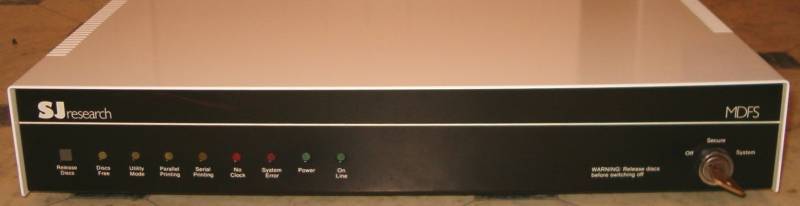
On the front is the Release Discs button, used to ensure any data in the buffer to the discs before changing discs or switching off the MDFS.
Then, a set of indicator lights as follows:
1. Discs Free - this illuminates when it is safe to remove the discs or power down the server. The lamp is broken on my MDFS as I have never seen the Discs Free light come on.
2. Utility Mode - this indicates that the MDFS is in utility mode (for configuration and system management operations) rather than work mode.
3. Parallel Printing - this means the parallel printer is in operation or there is data in the printer buffer. If you haven't printed anything and the light is on, it means that the MDFS is trying to print out an error message.
4. Serial Printing - the serial printer is running.
5. No clock - this means the MDFS cannot detect a clock signal on the network.
6. System Error - something is very badly wrong and fortunately I have not had this light up yet!
7. Power - always illuminated when the MDFS is switched on.
8. On Line - the MDFS is in work mode if this light is illuminated.
On the right-hand side is the keyswitch. You can only turn the MDFS on if you have the key. It has three modes, off, secure and system. Secure mode means normal running operation whilst System mode allows certain privileged functions to be carried out, such as going into terminal emulation mode and resetting the MDFS clock.
I usually leave the key in the switch whilst the MDFS is on but of course it should be removed if it is in a work environment.

|

|