

BeebMaster's Domesday Machine
LV-ROM Player Remote Control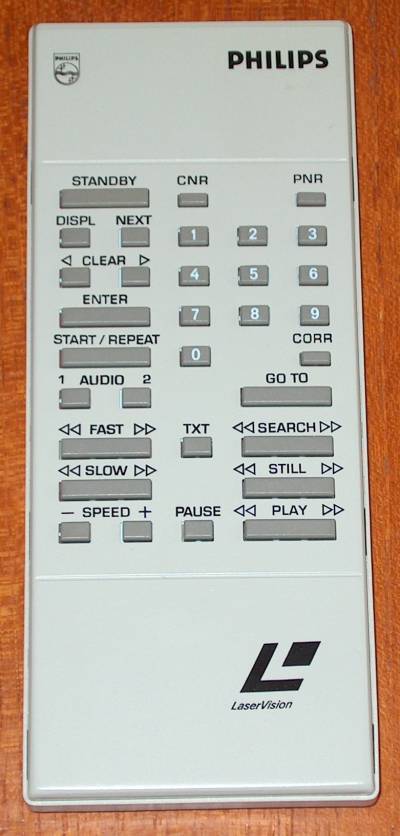
BeebMaster's Domesday Machine
LV-ROM Player Remote Control
With a fully working Domesday System, the remote control should not be necessary. It can, however, be used to control certain functions, some of which are not available from computer control.
STANDBY will stop the Laserdisc playing and put the machine into standby mode.
CNR and PNR are used for displaying the Chapter Number and the Picture Number. With the display on, you can use the remote control numbers to select the chapter number or frame number and then press GOTO and the LV-ROM will go to that chapter or frame and continue playing. Be careful though - if you pick a frame number out of range, the laser will crash into the end of the shaft and make some very distressing noises.
DISP shows information about the current settings of the laserdisc player and the disc in use.
NEXT, CLEAR, ENTER and CORR are used when inputting a play sequence. With the chapter number or frame number showing, pressing DISP shows the current programme and allows this to be re-programmed.
AUDIO 1 and 2 switch on and off the left and right sound output.
The various playback modes available to laserdiscs can be selected using the PLAY, FAST, SLOW, SEARCH and STILL buttons. Each has a forward and reverse function, all of which can be used when playing a CAV disc. PLAY selects normal speed forward or reverse play, FAST and SLOW select forward or reverse play at the current fast or slow speed setting, which can be changed using the SPEED buttons whilst in fast or slow mode.
SEARCH allows you to fast forward or rewind through the contents of the disc and STILL steps through the pictures on the disc frame by frame, forwards or backwards. This is handy for viewing the picture montages on the National Disc.
CLV discs have only very limited playback functions, being play forward, and search backwards and forwards. All the other playback mode buttons do not have any effect when playing a CLV disc.
PAUSE halts playback and switches the audio and video off, but keeps the current position so that playback can be resumed later.
TXT enables Teletext on the disc, for decoding by the TV receiver the player is connected to, but laserdiscs with Teletext on are few and far between!